
App Volume Mixer — Per-App Volume Control for Mac
App Volume Mixer lets you set the volume of each app on your Mac separately, like the Windows Volume Mixer. Mute noisy apps, boost quiet ones up to 400%, right from the menu bar. One-time purchase, $9.99.
One-time purchase · 3 Macs · free updates · 14-day trial · 14-day money-back guarantee
- Version 1.0
- Requires macOS 14.2 Sonoma or later
- Universal Apple silicon & Intel
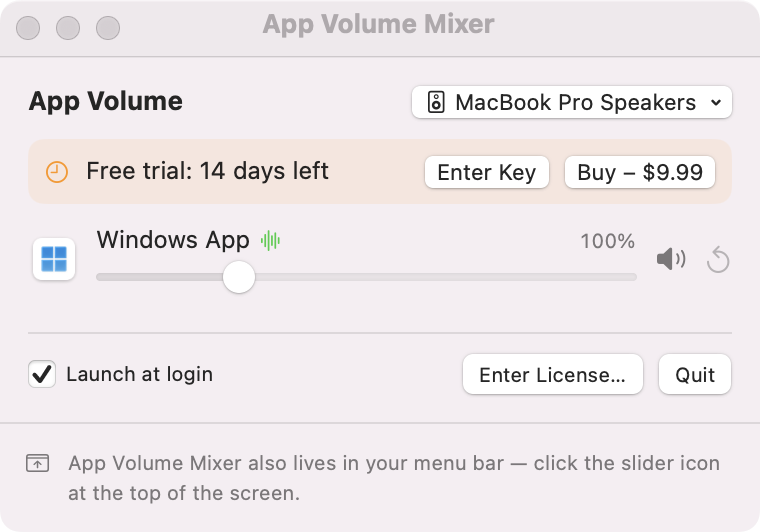
Set the volume of each app, separately.
macOS has one volume slider for everything. App Volume Mixer adds a slider for every app that plays sound, so a video call can stay loud while music stays in the background — and a notification-happy app can stay silent.
A slider for every app
Every app that plays audio appears automatically, with its icon, a 0–400% slider and a mute button.
Boost quiet apps
Go beyond 100% for apps that are too quiet, or to make up for macOS lowering other apps during calls.
Remembers your settings
Each app keeps its volume the next time it plays sound — no need to set it again.
Follows your output
Switch between speakers, headphones, AirPods or a USB interface and every app keeps its level.
Smart grouping
Browser helper processes are grouped under their app, so Chrome is one slider, not five.
No driver to install
Built on Apple's Core Audio process taps (macOS 14.2+). Apps left at 100% are not processed at all.
Lives in the menu bar
One click to open, launch at login, no Dock icon.
Install in under a minute
- Download AppVolumeMixer.dmg and drag App Volume Mixer to Applications.
- Open it — a slider icon appears in the menu bar.
- Move an app's slider. The first time, allow System Audio Recording so the mixer can adjust that app.
Requirements
- macOS 14.2 Sonoma or later (Apple silicon and Intel)
- System Audio Recording permission (asked once)
Good to know
- When an app uses voice-chat mode (FaceTime, Zoom, some camera apps), macOS itself lowers all other audio. App Volume Mixer cannot switch that off, but it can boost the other apps to compensate.
How App Volume Mixer compares
| App Volume Mixer | macOS built-in | Virtual audio driver apps | |
|---|---|---|---|
| Volume per app | Yes | No | Yes |
| Boost above 100% | Up to 400% | No | Varies |
| Installs an audio driver | No | — | Yes |
| Remembers each app's level | Yes | — | Varies |
| Price | $9.99 once | Included | Free to subscription |
Comparison based on publicly documented features as of 2026-10-23.
App Volume Mixer FAQ
Can you change the volume of individual apps on a Mac?
Not with macOS alone — the system has a single output volume. App Volume Mixer adds a separate volume slider for every app from the menu bar.
Is there a Windows-style volume mixer for Mac?
Yes. App Volume Mixer works like the Windows Volume Mixer: every app that is playing sound gets its own slider and mute button.
Why does my Mac lower other apps' volume during calls?
Apps that use Apple's voice processing (FaceTime, Zoom, Teams, camera and intercom apps) make macOS 'duck' all other audio so speech is clearer. macOS has no switch to turn this off, but you can raise the other apps with App Volume Mixer to compensate.
Does App Volume Mixer install an audio driver?
No. It uses the process taps Apple added in macOS 14.2, so there is no virtual device, kernel extension or driver to install or remove.
Does it affect sound quality?
Audio stays in 32-bit floating point at your output device's sample rate. Apps left at 100% are not touched at all.
Does it work with AirPods and Bluetooth speakers?
Yes. It follows whatever output device macOS is using and moves your settings over when you switch.
Guides
Try App Volume Mixer free for 14 days
One-time purchase · 3 Macs · free updates · 14-day trial · 14-day money-back guarantee
Need more than one app? Get all three for $24.99 — also works with NetScope and AutoKey.